
Building Model Faceoff
Compare AI Models from Different Providers Side-by-Side
The Problem: One Model Doesn't Fit All
As AI models proliferate, choosing the right one for your task has become increasingly difficult. Different models excel at different things:
- GPT-4o excels at creative writing and nuanced conversations
- Claude is known for careful reasoning and following instructions
- Gemini offers strong multimodal capabilities and long context windows
- Llama 3 provides excellent performance for open-source enthusiasts
- Mistral delivers impressive results with lower latency
When you're building AI-powered applications or just trying to find the best model for your workflow, you need to actually compare outputs side-by-side. Opening multiple browser tabs to different AI playgrounds is tedious. Copy-pasting prompts between them is error-prone. And tracking which model performs best for specific tasks? Nearly impossible.
I needed a tool to compare models simultaneously, with real-time streaming, conversation history, and cost tracking—all in one place.
The Vision: A Desktop Command Center for AI Models
I set out to build Model Faceoff: an Electron desktop app that serves as a single interface for comparing any AI model from any provider. The core principles:
Side-by-Side Comparison
Compare up to 3 models simultaneously with the same prompt. See responses stream in real-time and evaluate quality differences instantly.
OpenRouter Integration
One API key gives you access to 100+ models from OpenAI, Anthropic, Google, Meta, Mistral, and more. No need to manage multiple API keys.
Local-First Architecture
All conversation history and preferences stored locally in SQLite. Your data stays on your machine. No cloud sync, no subscriptions.
Usage Tracking & Cost Estimates
Track token usage, response times, and estimated costs per model. Make informed decisions about price-to-performance tradeoffs.
Model Faceoff in Action
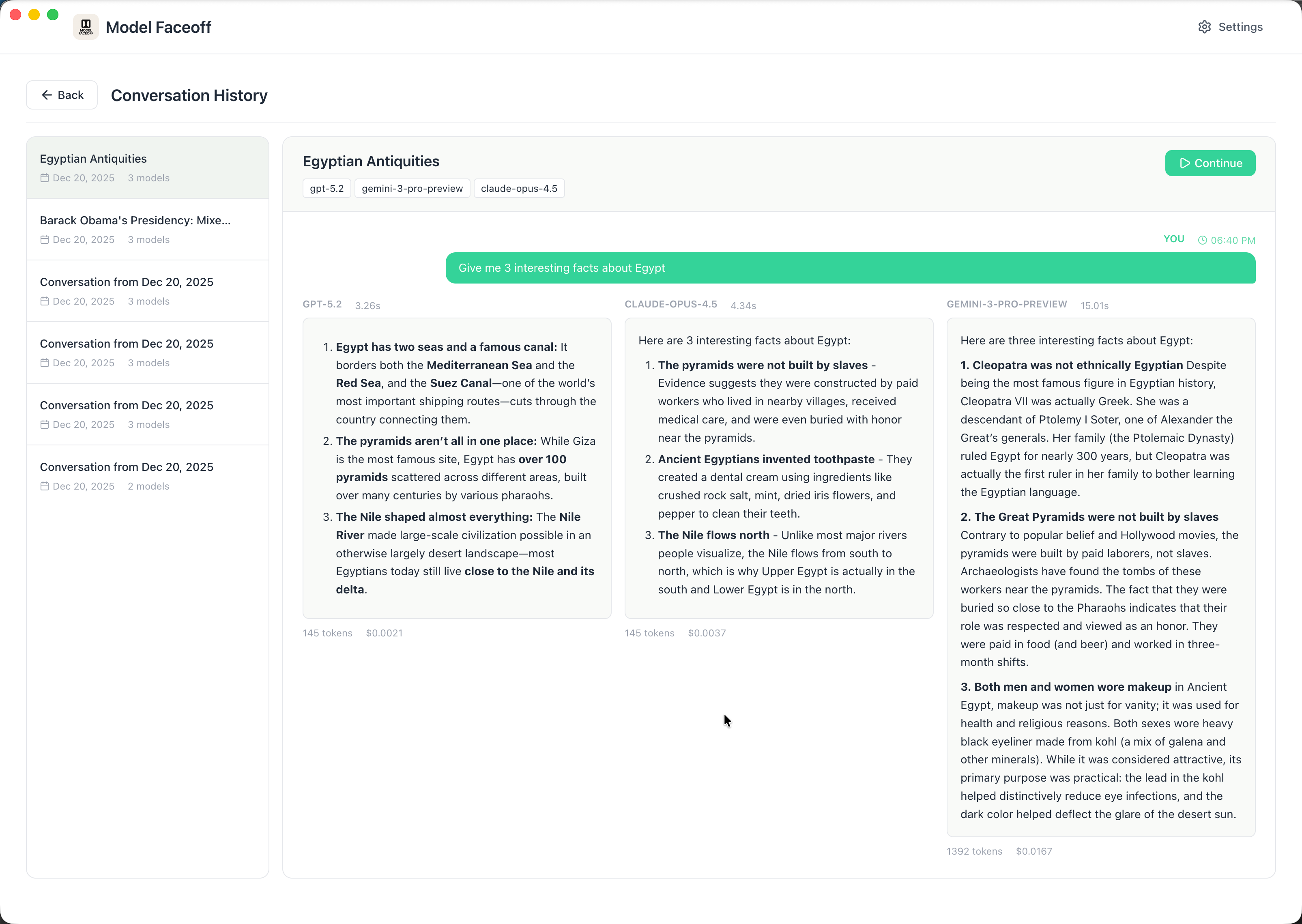
Side-by-Side Model Comparison
Compare responses from multiple AI models simultaneously. Each model streams its response in real-time, with full markdown rendering and syntax highlighting for code blocks.
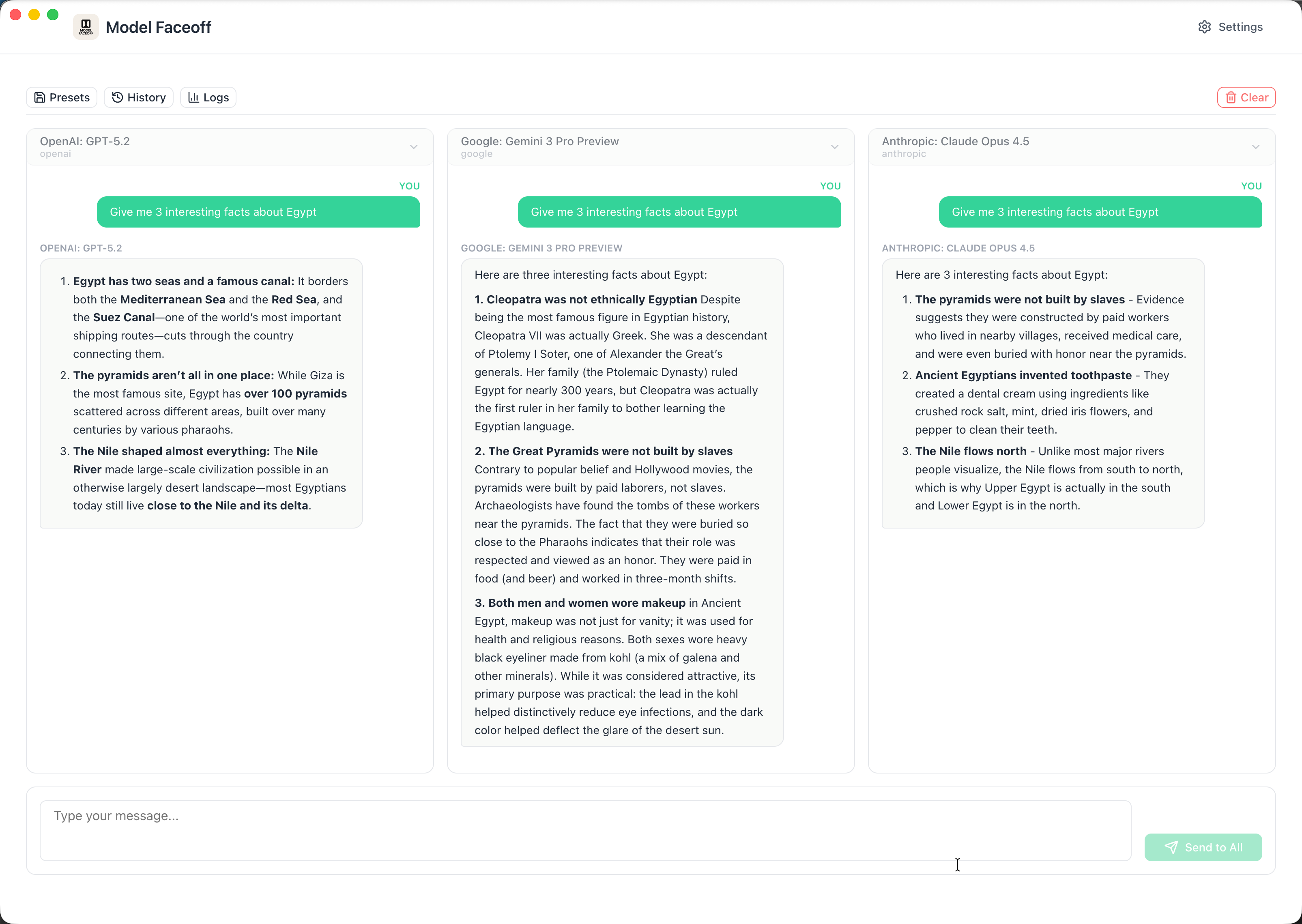
Model Selection
Choose from 100+ models across OpenAI, Anthropic, Google, Meta, Mistral, and more—all with a single API key.
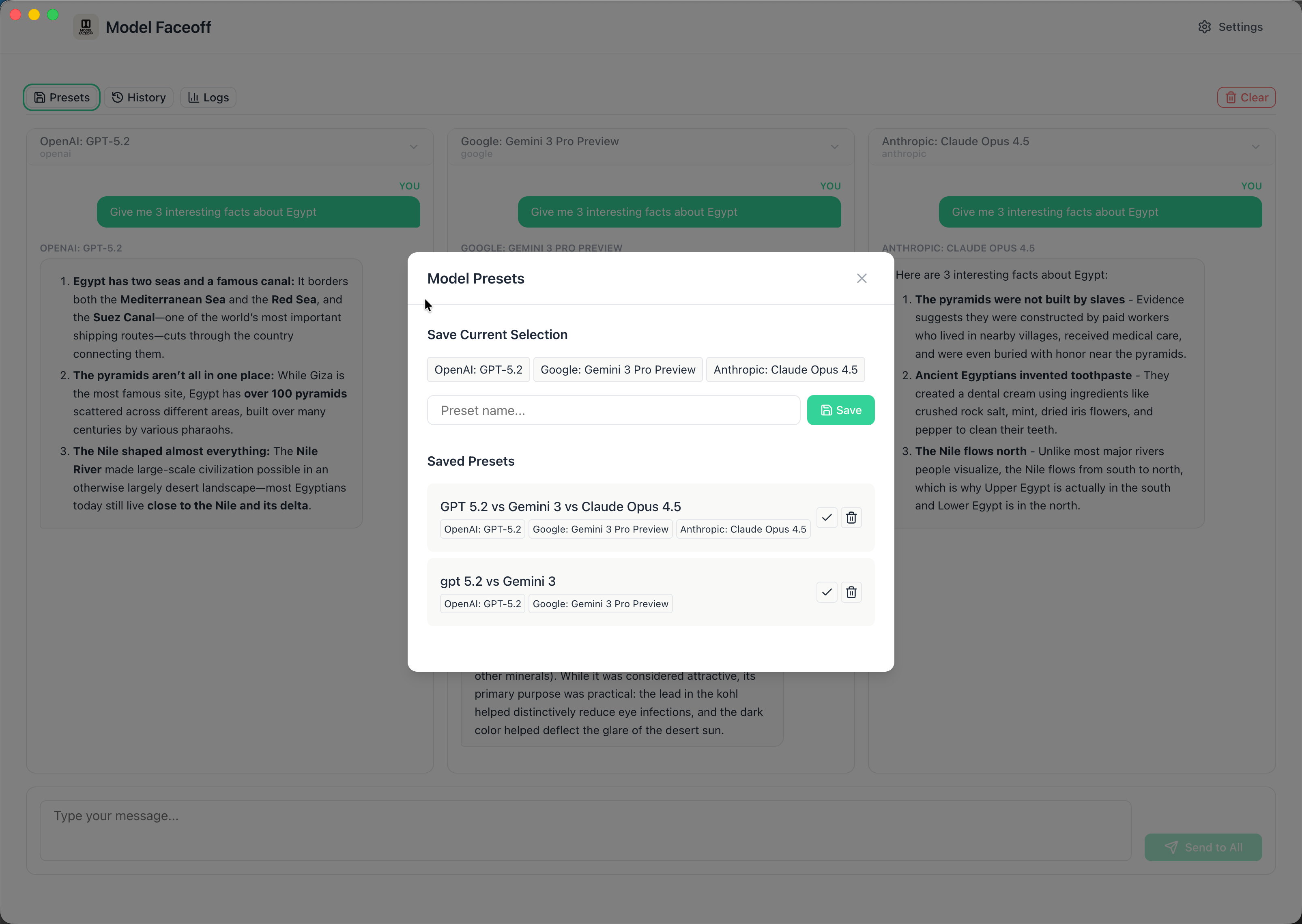
Conversation History
All conversations saved locally with full search. Replay any comparison and see how different models responded.
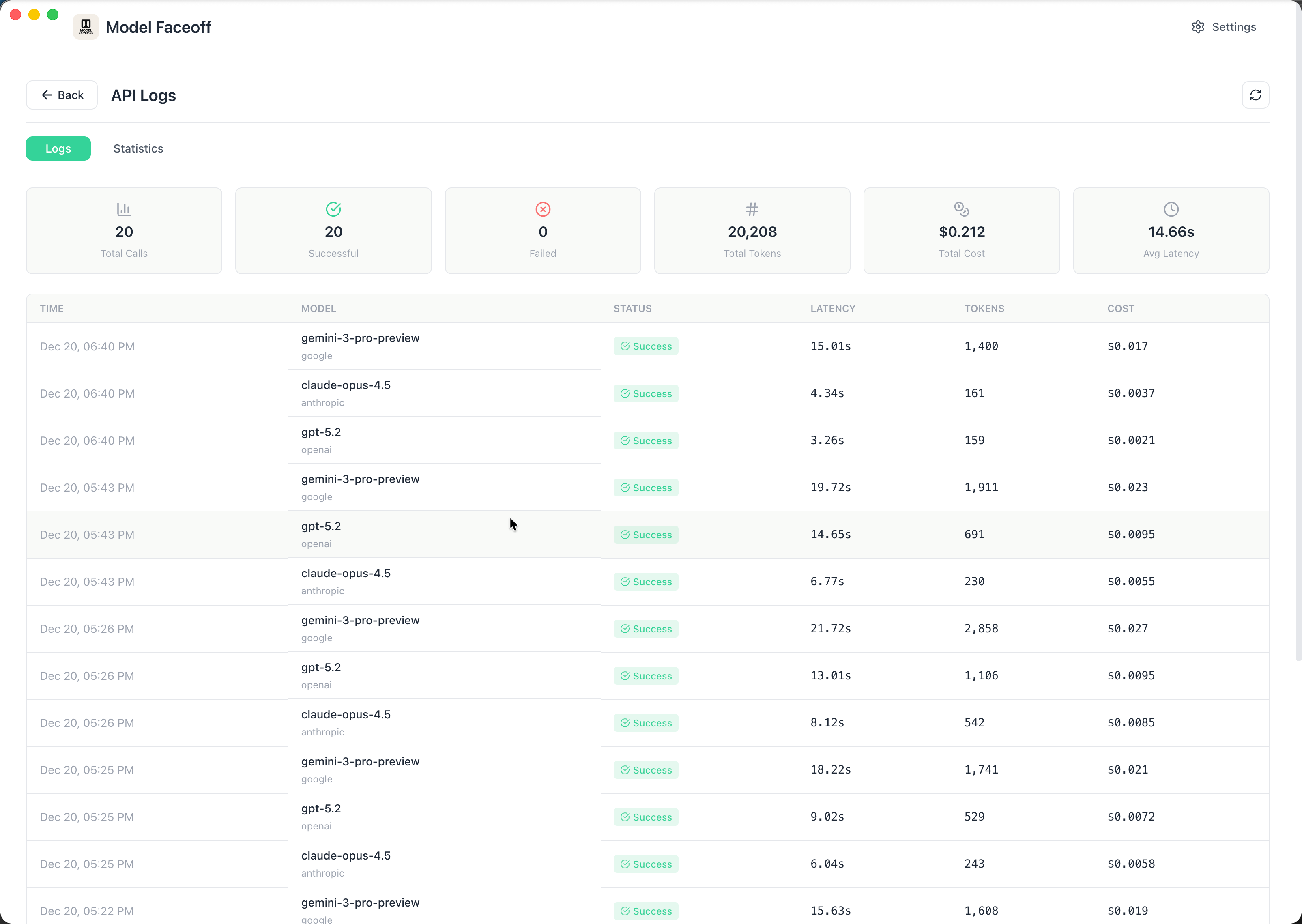
API Logs & Debugging
Full visibility into every API call with request/response details, latency metrics, and token counts for debugging and optimization.
Key Features
Streaming Responses
Watch responses appear in real-time as models generate them. No waiting for complete responses—see the thinking unfold token by token.
Markdown Rendering
Full markdown support with syntax highlighting for code blocks. See formatted responses exactly as they're meant to be displayed.
Conversation History
All conversations saved locally with full search capabilities. Replay any conversation, compare how different models responded to the same prompts.
Model Presets
Save your favorite model combinations as presets. Switch instantly between "Creative Writing" (GPT-4o vs Claude) and "Code Review" (Claude vs Gemini) configurations.
API Logs & Debugging
Full visibility into every API call. See request/response details, latency metrics, and token counts for debugging and optimization.
Auto-Updates
Automatic updates via GitHub Releases. The app checks for new versions and offers one-click installation—always stay current with the latest features.
The Tech Stack
Electron + React 19 + TypeScript
Electron provides the desktop runtime, React 19 handles the UI with its latest concurrent features, and TypeScript ensures type safety across the entire codebase. The multi-process architecture (main process, renderer process, preload script) keeps the app secure and performant.
SQLite with better-sqlite3
All data persists locally in SQLite. The synchronous API of better-sqlite3 makes database operations predictable and fast. WAL mode ensures concurrent read access without blocking. Conversations, messages, settings, and API logs all live in a single portable database file.
Vite + Electron Forge
Vite provides lightning-fast hot module replacement during development. Electron Forge handles building, packaging, and publishing for macOS (DMG), Windows (installer), and Linux (deb/rpm). Three separate Vite configs manage main process, renderer process, and preload script builds.
Tailwind CSS + shadcn/ui
Utility-first CSS with Tailwind keeps styling consistent and maintainable. Radix UI primitives from shadcn/ui provide accessible, customizable components for dialogs, tabs, and form elements. The result: a polished, native-feeling desktop experience.
OpenRouter API
OpenRouter provides a unified API for 100+ models from different providers. One API key, one interface, endless possibilities. The app fetches available models dynamically, so new models appear automatically as OpenRouter adds them.
The Architecture: Electron's Multi-Process Model
Electron enforces security through process isolation:
- Main Process: Node.js environment running
main.ts—manages windows, handles system APIs, initializes database, runs auto-updater - Renderer Process: Browser environment running React—completely isolated from Node.js APIs for security
- Preload Script: Secure bridge exposing specific IPC channels via
contextBridge
IPC Communication Pattern
Every feature follows a strict IPC contract with typed responses:
// All IPC handlers return IPCResponse<T>
interface IPCResponse<T> {
  success: boolean;
  data?: T;
  error?: { code: string; message: string };
}

// Renderer calls main via window.api
const result = await window.api.conversations.create({
  modelIds: ['gpt-4o', 'claude-3-opus'],
  title: 'My comparison'
});

// Type-safe access to response
if (result.success) {
  console.log(result.data.conversationId);
}
This pattern provides compile-time safety for all cross-process communication. TypeScript catches type mismatches before runtime, and the standardized response format makes error handling predictable.
The Database Design: Simple and Effective
SQLite with WAL mode provides concurrent read access while maintaining data integrity. The schema is intentionally minimal:
Core Tables
- settings: Key-value store for configuration (API key, preferences, window state)
- conversations: Parent records with title, model IDs, timestamps
- messages: Individual messages with role, content, model ID, token counts
- api_logs: Full request/response logging for debugging
The synchronous API of better-sqlite3 simplifies code significantly—no async/await ceremony for database operations. This makes the codebase more readable and eliminates entire categories of race conditions.
The Streaming Challenge: Real-Time Token Display
Streaming responses from multiple models simultaneously requires careful coordination:
- User sends prompt → Main process receives via IPC
- Main process initiates parallel fetch calls to OpenRouter for each selected model
- As chunks arrive, main process emits events back to renderer via IPC
- Renderer updates UI in real-time, accumulating tokens per model
- On completion, full response saved to database with token counts
The challenge: Electron's IPC is event-based, not streaming. Solution: chunked events with model identification:
// Main process emits chunks as they arrive
mainWindow.webContents.send('stream-chunk', {
  modelId: 'gpt-4o',
  chunk: 'Here is the ',
  done: false
});

// Renderer accumulates chunks per model
window.api.onStreamChunk((data) => {
  setResponses(prev => ({
    ...prev,
    [data.modelId]: prev[data.modelId] + data.chunk
  }));
});
This architecture handles any number of concurrent streams without blocking the UI.
Cross-Platform Distribution
Model Faceoff runs on macOS, Windows, and Linux with platform-specific installers:
macOS
DMG installer with Apple Silicon and Intel builds. Code-signed and notarized.
Windows
Squirrel installer with auto-updates. Single .exe setup.
Linux
DEB and RPM packages for Debian/Ubuntu and Fedora/RHEL.
Electron Forge's publisher-github integration automatically uploads release artifacts to GitHub Releases. The electron-updater package checks for new versions on startup and offers one-click installation.
The Challenges and Trade-Offs
1. Bundle Size Management
Electron apps ship with Chromium, resulting in 150MB+ base size. Vite's tree-shaking and the auto-unpack-natives plugin help minimize additional bloat. The tradeoff: desktop power for download size.
2. Cross-Process Type Safety
TypeScript doesn't inherently understand IPC boundaries. The solution: shared type definitions imported by both main and renderer, with the preload script serving as the type-safe contract between them.
3. Native Module Compatibility
better-sqlite3 is a native Node.js addon that must be rebuilt for each platform and Electron version. Electron Forge's rebuild plugin handles this automatically, but CI/CD pipelines need separate builds for each target.
4. Rate Limits and Error Handling
OpenRouter passes through rate limits from upstream providers. The app handles 429 responses gracefully with user feedback. Each model stream operates independently—if one fails, others continue.
The Results: One Interface for All Models
Without Model Faceoff
- Open 3 browser tabs to different AI playgrounds
- Copy-paste the same prompt to each
- Wait for responses separately
- Manually track which model performed better
- Result: Fragmented, tedious, no history
With Model Faceoff
- Select 3 models from dropdown
- Type prompt once, click Send to All
- Watch responses stream side-by-side
- All conversations saved and searchable
- Result: Unified, efficient, full history
Technical Highlights
Conclusion: The Right Tool for the Right Job
Model Faceoff proves that Electron desktop apps remain a powerful choice for developer tools. The combination of web technologies for rapid UI development with Node.js for system access creates applications that feel native while shipping cross-platform.
The key insight: AI model selection shouldn't require faith. Comparing outputs side-by-side reveals differences that specs and benchmarks can't capture. What reads well in a GPT-4o response might lack the precision Claude brings to the same prompt.
With OpenRouter handling the API complexity, the app stays focused on what matters: making comparison effortless.
Stop guessing which model is best. Download Model Faceoff and see for yourself.
Tech Stack Summary
Frontend: React 19, TypeScript, Tailwind CSS, Radix UI (shadcn/ui), Lucide Icons
Backend: Electron 38, Node.js, better-sqlite3, electron-updater
Build: Vite, Electron Forge, PostCSS
API: OpenRouter (unified access to OpenAI, Anthropic, Google, Meta, Mistral, and more)
Distribution: GitHub Releases with auto-updates for macOS, Windows, Linux
Ready to Compare AI Models Like a Pro?
Download Model Faceoff for free and start comparing models side-by-side. Or if you need custom AI tooling built for your team, let's talk.